Étape 1 : Installez Evlop - Product options.
- Rendez-vous sur https://apps.shopify.com/evlop-product-options
- Installez l'application sur votre boutique Shopify
- Créez des jeux d'options de produit.
Étape 2 : Activez l'intégration Evlop - Product options.
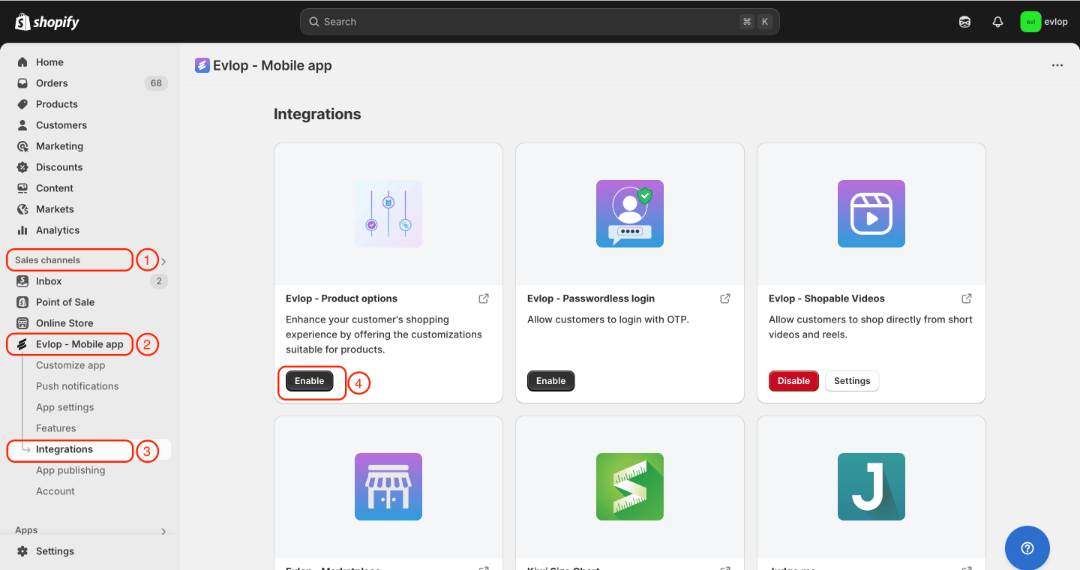
- Accédez à la section Sales channel de votre tableau de bord Shopify.
- Sélectionnez evlop mobile app
- Ouvrez la page Integrations.
- Accédez à Evlop - Product options
- Activez l'intégration Evlop - Product options.
L'intégration entre l'application mobile Evlop et Evlop - Product options est maintenant terminée.