Evlop includes a strong set of no-code blocks. When you need something specific, you can add your own custom blocks. Pick the approach that fits your skills and use case: a React Native block that runs inside the app, or an HTML block built with HTML, CSS, JS, Tailwind, and Liquid that renders in a WebView.
1) Creating custom blocks with React Native
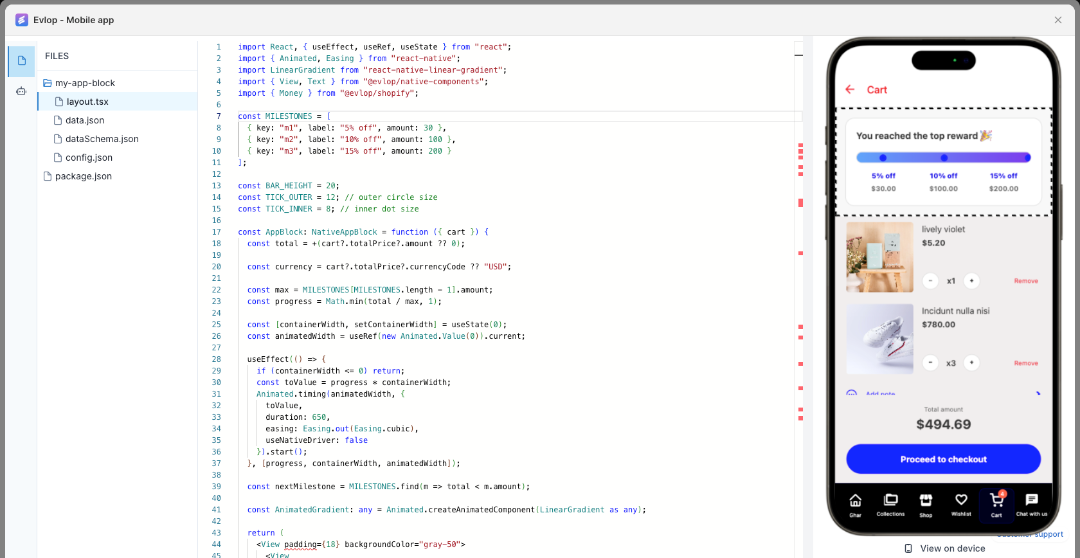
What it is
A React Native block is part of the native app. It’s best for smooth UI, gestures, animations, offline behavior, and device features.
What you can use
@evlop/native-componentfor coherent UI primitives@evlop/shopifyto access store data like the product, collection, cart, metafields, metaobjects, customer- All npm packages listed in
package.jsonof custom block editor can be imported and used
When to choose this
- You need high performance or complex interactions
- You want native navigation and device APIs
- You plan to cache data or handle flaky networks
Practical tips
- Keep block settings simple and serializable
- Be selective with dependencies to manage bundle size
- Test on home, product, and collection screens
- Validate accessibility, loading, and empty states
2) Creating custom blocks with HTML
What it is
An HTML block runs inside a WebView. Build with HTML, CSS, JS, Tailwind, and Liquid for fast iteration.
Data and limits
- Use Liquid to access Shopify context such as the active product or active collection
- Customer information is not available in this context
Navigation
- The Evlop web bridge upgrades plain
<a href>links to native navigation when a matching app screen exists
When to choose this
- Marketing or editorial content that changes often
- Lightweight widgets that show product or collection details
- Teams that prefer Tailwind and simple JavaScript
Practical tips
- Design mobile first with Tailwind utilities
- Keep scripts light and avoid heavy frameworks
- Use standard anchors so the web bridge can route natively
- Check contrast, spacing, and load time
Wrap up
Custom blocks let you tailor the app to your store without reinventing the wheel. Choose React Native for performance and deep integration, or HTML for speed and content-driven widgets.