步骤 1:安装 Evlop - Product options。
- 前往 https://apps.shopify.com/evlop-product-options
- 在您的 Shopify 店铺中安装该应用
- 创建产品选项集。
步骤 2:启用 Evlop - Product options 集成。
- 前往您的 Shopify 仪表盘中的 Sales channel 部分。
- 选择 evlop mobile app
- 打开 Integrations 页面。
- 前往 Evlop - Product options
- Enable Evlop - Product options 集成。
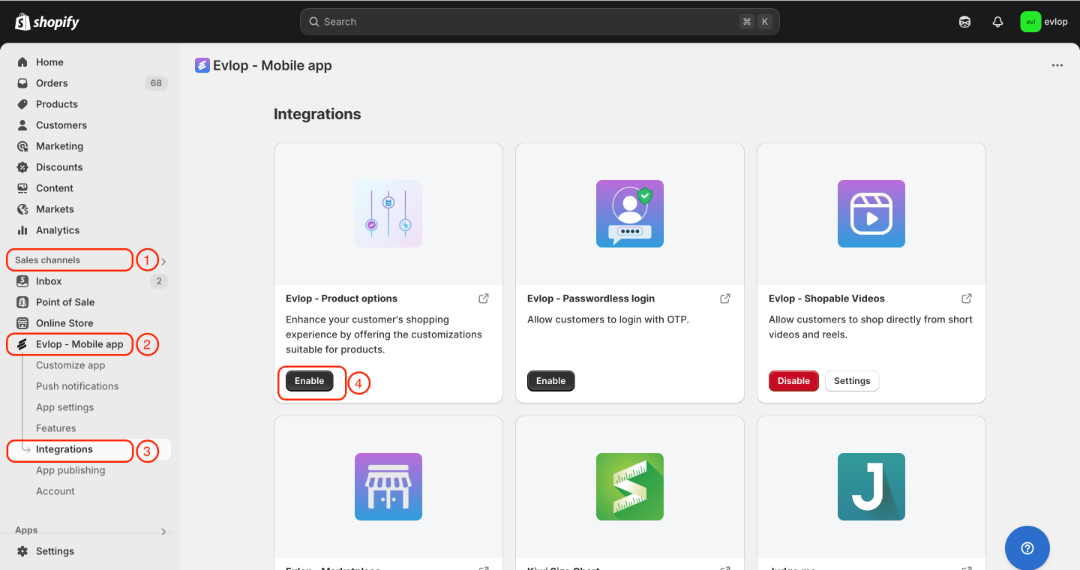
Evlop mobile app 与 Evlop - Product options 之间的集成已完成。