Passo 1: Installa Evlop - Product options.
- Vai su https://apps.shopify.com/evlop-product-options
- Installa l'app sul tuo negozio Shopify
- Crea i set di opzioni prodotto.
Passo 2: Attiva l'integrazione con Evlop - Product options.
- Vai alla sezione Sales channel del tuo dashboard Shopify.
- Seleziona evlop mobile app
- Apri la pagina Integrations.
- Vai su Evlop - Product options
- Attiva l'integrazione con Evlop - Product options.
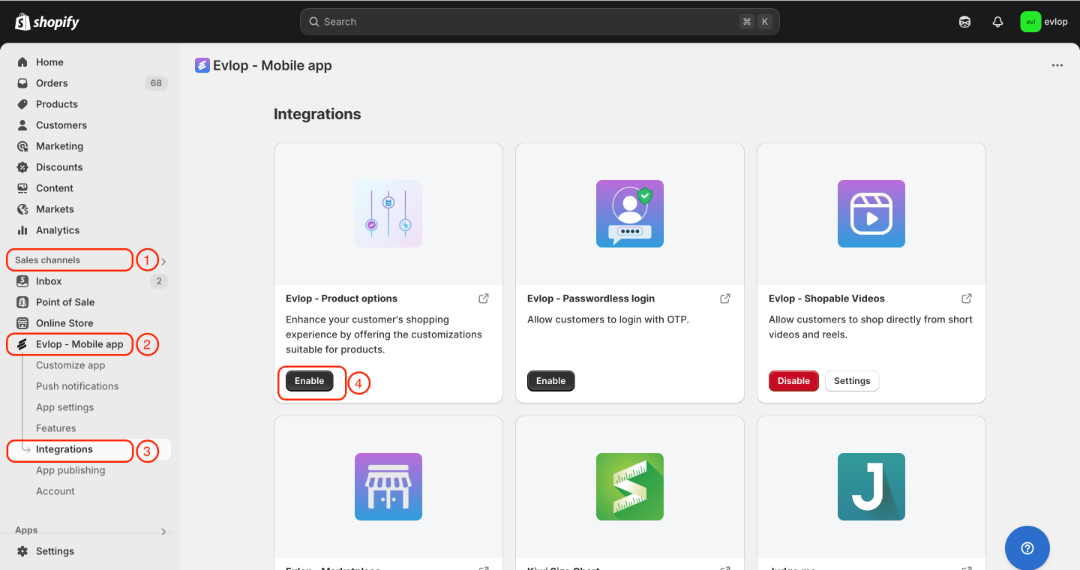
Il processo di integrazione tra l'app mobile Evlop ed Evlop - Product options è stato completato.